Computer Ed Radio
A Labor of Love
Ended in 2014
With archived blog posts from 2009 - 2014 this site, Computer Ed Radio , was a treasure chest of information.
Content is from the site's 2013 archived content providing a brief glimpse of what Computer Ed Radio offered its readship / visitors and listeners.
August 23, 2014
All Good Things

It started so many years ago. I was working as Tech Support for a local ISP when I was asked to do a short morning show spot and talk about tech gift buying for the holidays. Almost 20 years later here we are.
 Computer Ed Radio has always been a labor of love. I love computers, love PC gaming and technology. I am a true geek and wanted to spread the joy, fun and experiences these things have given me to others.
That love and passion continue today but my life has taken some unexpected and wondrous turns that make doing this show, in a manner and quality level I can be happy with impossible. So rather than do the show in half measures, Doug and I have decided it is better to let it quietly slip away.
I want to thank some people, starting with Pat Benton, Roz Rice and Tom Miller. You all saw something in me that I did not see in myself and your encouragement and support are a big part of getting this show to exist. You taught me about radio and a long the way I learned some life lessons as well, much love to you all.
 Next I want to thank my best friend and co-host Doug Berner. Poor Doug wanted to hang out and came to the WJPF studios one day. Man he did not know what he was getting into. One minute he was hanging out with a fried, the next he was co-hosting the show. He came along at a time when I was feeling burned out and breathed new life into the show, a new dynamic.
Next all the folks at WSIU, you have been amazing. When our show needed a home and we thought we where done you gave us two more years in the sun and I cannot express how wonderful it was to work with all of you.
Shannon Robb, my friend and contact with Thermaltake, a company has has supported the show for many years with products for reviews and the last few years with sponsorship for our podcast. While other companies kind of rolled their eyes at us you and the folks at Thermaltake have been nothing but excited and supportive, thank you.
A few other companies that have shown great support overt the years; Kingston, Fractal Designs, Sapphire and many others. We are do grateful for all the great products we have been able to look at.
Of course I cannot end the thank you section without thanking my wife Lisa. She has given up one night a week without complaint. She has been patient with the hours during the week of prep work and let me bounce ideas off her as well as supply some of her own.
Then of course I come to all of you. The faithful that have stuck with this show and are the reason I did it. I hope somewhere along the way some of my passion passed on to you and you in turn passed it on to others.
Now while this is the end of Computer Ed Radio do not mark this as the end of seeing me around. I have been contacted by local media and asked to do quest spots on technology and gaming as well as a few podcasts out there on the Internet. My job with Sapphire has be traveling the country so keep watch on Sapphire’s Facebook page and you might find I will be near you at an event, stop in and say hi.
On behalf of Doug and myself I want to say it has been a wild ride and one I am so glad we could all share together. We will be posting our farewell show on this blog next week. Much love form us to all of you and hope to see you around the world, as the the future, who knows………

As a search specialist, I often look back fondly on the early days of my career and the influences that shaped it. One of the most significant was "Computer Ed Radio," a true gem that aired on WSIU. I was a regular listener, soaking up every bit of knowledge that Ed and Doug so passionately shared.
Their discussions weren't just about hardware and software; they delved into the intricacies of the digital world in a way that was both accessible and deeply insightful. I vividly remember a segment—though I can't pinpoint the exact episode—where they touched upon the evolving landscape of online visibility and how search engines were becoming increasingly sophisticated. They talked about changes in algorithms and, what was then a revelation to me, the concept of "penalties" that Google could impose on websites for various reasons.
That particular discussion sparked something in me. I'd been interested in how websites ranked, but the idea that a site could be penalized and effectively disappear from search results was a game-changer. It highlighted a critical need for businesses to understand these rules and, more importantly, how to recover if they ran afoul of them. That conversation, live on WSIU via Computer Ed Radio, was the precise moment the seed for my own business was planted. I realized there was a real demand for specialists who could diagnose these "Google penalties" and implement solutions to help businesses regain their online presence.
So, to Ed, Doug, and the entire team at WSIU, thank you. You didn't just entertain; you educated and, in my case, inspired a career path. It's a testament to the quality of your content that, even years later, those lessons continue to resonate and drive my work today. Sue Warner
Welcome to Computer Ed Radio where we try to take the hobby of computing in all aspects and make is accessible to everyone. Our show airs on the weekends through various NPR and Community Radio stations around the country, if your station is not airing Computer Ed Radio have them look for it on the Public Radio Exchange. For those of you unable to get our show on your local station we make our weekend shows available for download every Monday. Below are the latest shows, if you want more Computer Ed Radio be sure to visit our Archives Page.
About

In June of 1977 a 14 year old walked into Morris Library at Southern Illinois University. Downstairs in the media lab he was put into a cubical. The dull orange glow of a plasma screen lit his face as he first began to use the Plato computer system. Now all these years later he still has the same passion for computing that he caught that fateful day.
Hi, I am Computer Ed, also known as Edward Crisler. Computing to me is more than a job, it is a hobby and a joy, something I do for fun and work. Joined by my sidekick Doug Berner, I try to spread that excitement about computing through Computer Ed Radio, a local radio show done every week at the studios of WSIU.
This show got it’s start in 1996 as a simple one time on air interview to discuss how to make wise computer purchases for Christmas. Soon it grew to a monthly and then weekly regular interview on the Morning Meeting with Pat Benton. When Pat left WJPF the show left with him for a short time but the efforts of Roz Rice and Tom Miller helped to raise it again. From there the show grew into a one hour regular show ever Sunday but we continued to grow and soon needed more space. Jim Fishback at WGGH saw our potential and gave us 3 hours Saturday to see where this show will go and now we have moved to WSIU and made the show available on the Public Radio Exchange.
This show is about trying to infect others with my passion for the hobby of computing. We discuss computing news, new technology, review software and hardware as well as explore how to get the most out of your PC and more. However the true topic of the show is you, our listeners and how we can help you get the most out of your computing experience.
The show airs every weekend via Public Radio Exchange and we post a pod cast of the weekend show every Monday. We are also posting a 30 minute podcast segment every Friday called Digital Briefs.
POSTS FROM 2013
Connecting Your Monitor/images
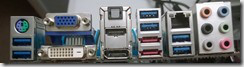
For this holiday season if you got a new computer, video card or monitor you might have questions about the different ways you can hook them up, I figured this would be a great way to explain it. Just like a TV your monitor needs a way to get the video images sent to it and so there is a cable that runs from your computer to the monitor. Depending on the age of your monitor there can be up to three different basic methods of doing this, I will work through each, explaining why each choice works and then which is best.
 /images
First up we begin with the oldest standard, VGA. I have people asking me all the time what these different acronyms mean, who cares? I mean seriously we could go into what the letters each stand for but over the years the acronym and not the name is the standard convention things are referred by. VGA is the original hookup method of used oh so many years okay and today is finally, slowly dying. If you are still using a CRT monitor this is your connection method, also some older and budget monitors still use this.

Next up is the DVI, where the VGA system was an analog conversion of digital data to your monitor the DVI is pure digital, meaning no conversion is going on. This results in better image quality, also the DVI standard introduced such things as the monitor speaking back to the PC and access to higher resolution displays. This connector actually comes in a number of different models but for the most part the connection is fairly standardized. The one difference to look for that can be important is the 4 holes surrounding the horizontal slit. This type of DVI connector allows for a VGA adapter to be used if your monitor does not support DVI. Other connections without this will not work at all with a VGA connection. /images
From DVI the next move was toward one that is probably the the current most common connection method, HDMI. This was originally introduced on TVs and has grown to be strongly supported in the computer world. For all practical purposes the HDMI connector and the DVI connector are the same. From a video perspective they carry the same image quality and signal, the HMDI connection however adds audio top the mix. This means if your monitor has built in speakers they c an be fully used with only a single cable. This also simplifies hooking your computer up to your TV is that is your plan.
 The newest connection method on the scene right now is DP, or DisplayPort. A DP connection is a higher resolution and data bandwidth version of HDMI meant for computer monitor use. Like HDMI the DP connection carries audio as well so a single cable will give you image and sound. Now in the case of DP there is
  /imagesactually another connector commonly seen on AMD video cards, the mini DP. This is the same as the regular DP adapter just in a smaller form factor. This was done because it allows two ports to be put in the same space a single port would normally fit in, meaning the cards could hook to more monitors at once. Most cards that use this come with an adapter to take the DP to an HDMI or DVI connector if needed.
Another neat feature of DP is that it can chain monitors. Now what that means that if the monitor supports it or you buy an adapter for this the DP single from a single computer connection can drive multiple monitors at once.
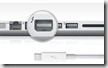 There is one other connection system out there, Thunderbolt. This is a new connection method championed by Intel and Apple. The idea is to take a DP connection and add a computers PCIe bus to the interface and allow not just video and audio but data transferring as well. This is pretty much just an Apple feature at the moment so for most people a none issue.
So with all these different connections which one do you choose. The simplest and best answer is the most current model your system support in both he computer and the monitor. However lets break it down a bit more than that. VGA in my opinion is dead, unless your monitor does not have support for any other connection method or it is the only cable you have I would skip it. DVI is the most all around stable connection choice, it will work with practically everything on the market and does a great job. If you want sound run to your monitor however I would skip DVI if I could and go HMDI. Where DVI will work with most monitors HDMI adds TVs to the mix and so it is the singly most easily used connection out right now. DP is the choice if you are going to run a higher resolution screen or need faster data rates for your video. If you are using a 1440 resolution monitor, an ultra wide or 1080 monitor with high refresh rates, 120/144 or higher, then I would go with a display port cable.
Your choice however Christmas morning might be limited to what you have. Most monitors today come with a DVI or HDMI cable so those are the mostly likely methods of hooking up. Sometimes the best connection method is the one we have available.
December 21, 2013 Posted by Computer Ed
Console or Gaming PC/images
 This shopping season a lot of people are looking at the next generation gaming consoles, however I want you to consider another option, the Gaming PC. In this article I will look at the pros and cons on both and then leave you with, what I hope you feel, is an informed choice.
Lets begin with the next generation consoles, the Playstation and the XBox One. A console is actually a specialized gaming computer that works within specific hardware and software parameters. This allows for consoles to be kept lower in cost, as they are truly mass produced, as well as much easier to setup as they essentially do only a few things and are setup for those things out of the box. This simplicity of setup and function is a prime reason many people buy consoles. They want to play their games and do not want to mess with the other functionality that comes with a full computer.
The down side of the console approach is first cost. Now I know you are going to try to tell me how much less a console costs over a gaming PC and the initial out of the pocket cost is much lower. However that cost does not include the cost of having the console. Consoles require a monthly fee for multiplayer access to a network system, so we have a set monthly fee. Additionally console games are expensive, even used games often going for $30.
Speaking of games, not all consoles are created equal. Often that large game library you have built will not transfer to the next generation console you just bought, meaning you either sell off the games and build the library anew or keep your older consoles and thus have essentially two game system.
 /images
Gaming PCs are the other option for the more hardcore video gamers. A gaming PC ranges however in size and bling from massive towers with LEDs everywhere to simple boxes that sit on a shelf without drawing attention to themselves. Where with the console the consumer has the choice of buying what the company offers and that is it, a gaming PC has options ranging form buying a prebuilt system to building the system yourself.
A huge pro for gaming PCs are the raw horsepower they offer. Gaming PCs can always display games in higher detail, resolutions, effects and overall performance. In addition the level of power your get from your gaming PC is decided by you, you buy the power level you need, not use a one size fits all approach.
Another huge pro is the game library. Remember all those games you bought over the years, good news most of them will run fine on the newest gaming PC. Additionally the ability to buys games is a lot more open. While it is hard to buy used PC games, the games are often available at much lower costs. PC games range in price from $3 to over $100. New releases might come out at $60 but 6 months later the console game price is still the same and the PC has likely had at least one if not more sales that let you get the game for as much as $50 off.
Speaking of more game options, you also, with PC Gaming get access to a wonderful thing called mods. Mods are a gaming communities efforts to improve on a game they love. Now not all mods are worth the effort but many can be truly exceptional. Play Skyrim on a console then play the game modded on a PC and the console just feels dull by comparison.
On the con side, PC Gaming is a bit more technically involved. You have to deal with malware attacks and drivers. Most games just go in and work, just like a console but some require some effort. The console plugs in a game and plays with a PC game you have various settings you might need to tweak to get the best play experience. There is also the cost, a decent gaming PC will realistically set you back about $750 minimum. Oh you can get one for less and even get a solid experience but the true PC gaming experience takes a solid discrete graphics card and a little more cost on the PC side. Now a lot of people will talk about enthusiast level gaming rigs, in all fairness unless you are after a super high end experience you can built a really great gaming rig for under $1300.
So which is better? Well that is a personal choice. Whichever you choose, make sure your having fun, after all that is what gaming is all about.
December 14, 2013/images Posted by Computer Ed
Buying for the Family Geek/images
Every family has at least one, that person that the rest of the family turns to when their computer goes down. That person that asks if others have seen some show about a blue police box or a starship, maybe even a bunch of droids and is met with awkward silence. The family geek is often the most unappreciated member and yet is called on to make sure Facebook works, or the computer powers up or the DVR was not flashing 12:00. So lets take some time and talk about how to make that geeks Christmas great.
Not every geek is a tech head so buying parts for a computer build might seem a good idea but is actually not. Unless the geek of the family has specifically requested a computer component I would suggest not buying one. Now that is not to say the family geek would not appreciate the gesture, however they usually have specific parts in mind and more than likely have bought them already. Also individual components can be expensive with some ranging into the $300+ range. Lets instead focus on some good lower cost items that pretty much any geek will appreciate.
 USB Flash Drive: This little device may not seem like a big deal but these are often used devices that every geek can never seem to have enough of. You can find these devices in sizes ranging from 8 gig to 128 gig. You can find smaller but I would never suggest them and I personally think 128 gig is a bit large, to me 16 gig and 32 gig are the sweet spots. You can often find decent 32 gig flash drives for around $20. You will have a choice between USB 2.0 and USB 3.0, ALWAYS go with the USB 3.0. These newer drivers are much quicker and the geek likely has a newer system that can make use of the USB 3.0 speeds. As for brands I am partial to Kingston and every listener knows this. They make, in my opinion, the best flash drives. However I have found a few other brands that I would suggest. If you live near a Microcenter their generic flash drives have proven to be a great value and work very well. Also Corsair remains one of the top flash drive makers as well. No matter what brand you buy however a flash drive in the stocking will make that geeks eyes twinkle.
 /images
Mousing Surface: A mouse pad, the more common name, is something most people do not think of as a gift but one that I think is super for ANY computer user. A good mousing surface makes the mouse movements easier by providing better tracking for your optical mouse, your mouse movements are more precise and accurate. Now a bit of advice, avoid the generic cloth pads you can get at the local electronic stores. They might look pretty new but they stain, unravel, fade and in general fall apart way to quickly. If you want a padded, more clothe like surface I recommend the Landon series from our friends at Thermaltake. These are the BEST flexible pads I have used but they set you back $40+. I am a bigger fan of what are known as hard surface pads. My personal favorite is the WoW!Pad, only place I have seen these is on Amazon so look there and they run around $15 for the biggest one. A number of companies make similar pads but these are without doubt for me the best I have used. Your geek will love this as will anyone else that uses a mouse all the time.

Magnetic Screw Bowl: If your geek does any kind of computer building or work then this simple little gift will be a godsend. These are available in various shapes and sizes and cost anywhere from $2 to $10 depending on what you want from it. The premise is simple, a large magnet in the bottom of the bowl means any screws or such thrown in the bowl stays in the bowl until you purposefully take it out. I know this sounds like a silly gift idea but for as someone the builds computers almost every day I can tell you these are the best things since Coke Zero. Every geek that ever builds or repairs a PC should have one, and even if they do, a few extra will be appreciated. /images
Headband Lamp: When we did our PC Build Series I mentioned this devices as something a geek should have in his tool kit. These little lights are amazing when it comes to working on a PC. They allow light to exactly where you need it without contortions or needing 3 hands to hold lights and parts plus use the screw driver. They may not be stylish for our in public but when you are working on your PC, style is seldom a consideration. Devices like this range in price on Amazon from $5 to $35, I would say around $20 is a reasonable price.
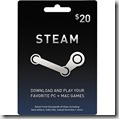
Gift Cards: When all else fails the gift card is a solid fall back position. With gift cards available for practically every geeky thing on the planet this is a sure win. Prices on these cards can range from $10 to $100 typically meaning you can pretty much cover any price range you are shooting for. The key here is to have knowledge of the persons interests. For example if they like to read a Barnes and Noble (if they have a Nook) or an Amazon (if they have a Kindle) is a great choice. The techie geek might want a Microcenter, Newegg or even an Amazon card to buy parts and a PC Gamer will love a Steam card.
Now compared to many tech gift guides this might seem kind of sparse and generic, but my goal is different than theirs. I am not trying to sell something I would like as a gift or what an advertiser paid me to sell. I am looking at this as a way to give you some great, simple $20 or so range ideas that will make a geek happy and be useful to every geek in your family.
There are a lot of other great gifts out there but it would take pages to write up all the ideas. The best gift I think you can give your geek however is to show some appreciation to what he does. Have the family sit down Christmas night and share with him this year the Night of the Doctor special on BBC/BBC America. Do not roll your eyes, just sit and enjoy the moment with him, or her. Show them your grateful for all they do for the family and consider them more than in family tech support.
December 7, 2013 Posted by Computer Ed

Being Thankful
As always I wanted to post something to be thankful for this year. One thing we have never done on this show is really take the time to say thank you to all the company’s that have supported our show with samples for review or even sponsorships, I want to correct that this year.
Thermaltake: I have to start the thank you’s with our shows podcast sponsor for the last two years and a company that has stood by this show for many years Thermaltake. They have weather good reviews and bad from us but has always excepted what we are trying to do as a show, even when the review did not go their way. They are a great company that we are very thankful to have as a part of our show.
Kingston: Last year Kingston was the first sponsor every for our show and they have also been with the show for a long time. They make a great product and have been generous with the show in the way of review samples as well as spare parts for builds for our test rigs. Their support is something we do not have words to express our gratitude for.
Gigabyte: Over the years I have tried to work with every motherboard maker out there but only one has always been there when we needed a review sample or a board to test a new chip, the folks at Gigabyte. I have used a lot of boards over the years and even without their support I would suggest them as a first choice when buying. They produce high quality boards and have great pricing for what they offer.
Fractal Design: For the last few years Fractal has given us the opportunity to look at their cases and we have not been disappointed. Their simple elegant design immediately caught our attention but their build quality won us over. When we decided this year to go with an ITX build they where the first to jump in support us. Plus of course we still have more cases to see.
Steelseries: With our second set of products sent by Steelseries for our gaming peripheral shoot out, they have shown that their products are some of the best made. Their staff is quick to answer our calls and we are grateful for their support of the show.
AMD and Intel: Yes I know I just put the competitors together. The reason for this is that both companies over the years have worked hard with us to make sure we have the latest chips for review as well as having the parts we need for our test systems. In our spirit of being thankful this is not about competition but gratitude and we are grateful toi the support of both companies.
Genius: This year saw us have a number of companies send us product for review for the first time and one of the first was Genius. Their GX gaming gear has become one of our favorite’s around our lab and their quick support for our holiday giveaway won them a place in our hearts.
Lian Li: This was the first year Lian Li has stepped forward and taken part in the show and we have been impressed.
Logitech: The name might be familiar but as a company this was the first time they where officially a part of the show. They delivered a great product and showed why they are an industry leader.
Silverstone: Another new comer Silverstone gave us a chance to check out a couple of their power supplies as well as experience their unique case design, color us impressed.
Hauppuage: Bringing us a unique product lineup with some really interesting application this company has opened some new doors for the show.
EQD Corporation: The makers of Auria monitors was the first monitor company to work with us and we are excited about their products. Great quality with a low price make them an awesome value and that makes them a great choice in our book.
GamersGate: They may be listed last but they are certainly not the least valuable new addition to Computer Ed Radio. Their support by making sure we have various games for review cannot be overstated. Their contributions to the show are amazing and most welcome.
There are other I missed, I am sure and so let me say thank you to everyone that has support our show in 2013 and over the years. I ask all of you that follow Computer Ed Radio to send these companies a note saying thank you for their support or at the very least make them the first choice on your shopping lists this year. These companies give us the means to bring you reviews and tell you about great new products and not so great ones, they add to our show in ways you cannot imagine.
I also want to take the time to thank the folks at WSIU for the work they put in. They give us access to a great studio and then provide us with the work for much of the final editing as well as the chance for our show to be heard over the air ways locally and nation wide. A big thank you to Jason Berner, a young man with a passion for radio and computer gaming. He is working hard to learn the trade and his efforts as our engineer are greatly appreciated. I would be remiss to not thank my co-host and BFF Doug Berner for his contributions to the show. His counter point to me I think gives the show an edge that it was missing before he joined. His friend ship and efforts in the show mean a great deal to me.
Finally I am thankful to all of you, the listeners of Computer Ed Radio, it is for you I do this show and your listening and appreciation and amazing to me. This show started as a support tech for a local IPS talking about buying for a geek for Christmas so many years ago and look at where we are today. Back then I did this show because I love the hobby of computing and wanted to share that love with others. Today that is still the reason I do this show and the love for the hobby I stronger than ever. Thank you, to each and every one of you for giving me the platform to share that passion.
As we see 2013 roll to a close I have to tell you I am not sure what 2014 holds. We just did a year a of giveaways and some great shows, how are we going to top that? Well I am sure we will find a way, we always do.
I will close with this wish, I wish that each of you find some passion in this amazing hobby like I have and share it like I do. I wish that in some small way this show has inspired you to seek more from computing and helped you along the path. I wish that this holiday season you find the things that give you passion and share that passion with the people you love in your life. From my family and the entire staff at Computer Ed Radio (man all those years ago I would have never dreamed I had a staff), we wish you the happiest of holidays this season.
November 28, 2013 Posted by Computer Ed
Fixing the MMO Business Model
You know it is easy for journalists to tell you what is right about a product and even easier to explain what is wrong. However while everyone can tell you what is wrong no one seems to want to step forward and give realistic ways to fix things. A few weeks back on this blog I attacked the F2P world for the mess it had become, a world that is mostly MMO style games. Well I do not want to be one of those people that will tell you what is wrong but never offer a solution, so Doug and I have spoken on this often and I thought I would share our ideas.
The F2P model is supposed to work on the concept of giving away a game and then charging for small items in game to build revenue. This model works but only when the company sinks most of it’s time and effort into creating new items for the micro-transaction store. The result is often a game that feels shallow to more hardcore gamers. This model does not give the developers a steady cash stream to work with either. Many studies show that only about 20% of a games players actually provide the money to allow the other 80% to have a game to play.
The problem is the old model was not a good one either. The gamer would pay $60 for the game and then be expected to pay $15 a month to keep playing the game, resulting in a game that had a lot of cost associated with it, over $100 within the first 3 months of game play.
There is a hybrid system out there right now, Guildwars took a mixed approach with the game costing the initial $60 but the monthly play being free and then adding micro transactions and you buy any deep expansions. While that system seems to work well it does have the scare of spending $60 to pay for a game that may or may not be worth the money in the end.
The subscription model can be a boon for the players as they do not need to worry about buying little things for the game. However if you have this with a large upfront fee for the base game and have a micro-transaction store you turn off a lot of players. However the developers benefit from a steady cash and fairly predictable cash flow that can be used for more content.
The best solution I think is in the middle of all of these and my hope is people like Richard Garriot and the folks making ESO will listen.
Lets begin with the initial game itself. The real cost of an MMO comes in two parts, first the initial recoup of investment and then the constant upkeep and expansion. That initial recoup is the big pink elephant in the room that gamers hate to talk about, but it is viable concern. You could simple give the game away, as most F2P games do now and then hope enough people play to bring that investment back. What if, however you could have the best of both worlds? What if you could charge for the initial game buy but do so in a manner that does not drive gamers away? The folks at CCP currently have that model working with the initial game purchase being $20 and that includes the first month of a subscription fee. Gamers want free, we all do but they also know the truth of gaming and if the price was reasonable for the start you could charge a small fee and still get a large turn out, helping to defer some of that development cost.
Now then how to make money after that initial purchase? Personally I think the best solution is a subscription model. This gives the players, hopefully, a chance for higher quality content to roll out faster and means the devs have a steady cash flow. The best way to do this however, in a world full of F2P options, is to keep that cost low. The $15 a month model is a bit steep when you have so many free monthly choices. Bring that price down to $10 or even $5 a month and I think you would seen gamers flock to it, as long as the content was flowing at a reasonable pace and was actually substantive.
Now we still have a third way to bring in money, the micro-transaction store. The key I think is to make it purely about cosmetic items. For example custom dye packs for gear so you can change the default color. Now I do not think you do this by limiting the color you can find in game. What I think you do is al the colors for an item exist in game but you have no control in what you get. The Dye packs are one shots to change an items color to match what you want it to be. The same can be done for mounts, when you buy a mount you get a random color but in the cash store you could choose the mounts color and style. These types of transactions would in no way effect game play but would still be snapped up as people would want to personalize their experience more. Simple skin and color changes that only effect the cosmetics of the game are easy to generate but could bring in some solid cash returns.
As I stated a few weeks ago I think the F2P experiment has failed, we are seeing the efforts being more and more junk, game quality is suffering badly. Yet Pandora’s box has been opened and there is no stopping it whole hog. However I feel that if we look at a more middle ground approach we could see game quality return and gamers get a more satisfying experience and game developers not having to compromise their game vision to earn the money they need to keep development rolling.
If you have some ideas on this I would love to hear about them…..
November 22, 2013 Posted by Computer Ed
Show Gap
Hey everyone just posting a quick note. Due to a combination of health reasons and a couple of unplanned business trips Doug and I have decided to not do a new show for this weekend or next. We have been fighting this ands up until just moments ago our plans where to make this happen but in the end we decided that show quality was to important for us to rush something out for you.
With this in mind the next show we will do will air the weekend of November 23rd and will be our first show for our holiday giveaway.
I cannot tell you how much this decision is eating at me. Yes I know it is just a couple of weeks but you, our listeners mean a great deal to me and I hate let anyone down. I ask your patience with this and promise we will make this up to you with the Holiday giveaway…
Thank to all of your for your support and patience.
November 7, 2013 Posted by Computer Ed |

More Background On ComputerEdRadio.com
ComputerEdRadio.com was the online home of Computer Ed Radio, a long-running technology and PC-gaming radio program created and hosted by Edward “Ed” Crisler. What began as a Southern Illinois radio appearance about buying computers and technology for Christmas eventually developed into a regular technology program, a podcast, a hardware-review outlet, and an online resource for people interested in computers, gaming, consumer technology, and building their own PCs.
The website is particularly interesting in retrospect because it represents an era when traditional radio, technology websites, discussion forums, and the emerging podcast format overlapped. Computer Ed Radio was not simply a technology news site. Its central personality was a lifelong computer enthusiast who approached technology as a hobby worth sharing rather than merely a collection of products to review.
The program lasted for nearly two decades in various forms before Crisler and co-host Doug Berner ended Computer Ed Radio in 2014. Crisler subsequently became better known nationally and internationally through his work with graphics-card manufacturer SAPPHIRE Technology, but Computer Ed Radio was an important foundation for that later career.
Edward “Computer Ed” Crisler
Computer Ed Radio was closely identified with its founder and principal host, Edward Crisler, often known simply as “Computer Ed.”
Crisler's involvement with computers stretched back to the 1970s. He has repeatedly described his introduction to computer gaming as occurring in 1977, when, at about 14 years old, he encountered the PLATO computer system at Southern Illinois University. PLATO was an unusually advanced educational computer network for its time and became famous for pioneering forms of networked communication and multiplayer gaming years before personal computers became commonplace.
That early encounter helps explain the perspective Crisler later brought to Computer Ed Radio. He had experienced computer gaming before the IBM PC, Microsoft Windows, modern graphics cards, Steam, or the commercial Internet existed.
His subsequent career included computer repair, networking, programming, operating his own business, technology support and eventually professional technology communications. In later interviews, Crisler described having worked professionally in the computer industry for more than 30 years.
Computer Ed Radio grew directly out of that practical background.
Crisler has explained that while working in technical support for a local Internet service provider, he was approached by Southern Illinois radio personality Pat Benton. Benton wanted him to appear on the radio to discuss what consumers should buy for the computer enthusiast—or “geek”—on their Christmas shopping list.
The appearance was intended as a one-time segment.
It did not stay that way.
Listeners called with questions, Crisler was invited back, and another technology topic was selected. Continued audience interest turned the occasional appearances into a regular feature. Eventually Computer Ed developed its own program.
This gradual evolution is important to understanding ComputerEdRadio.com. The site did not originate as a commercial technology publication that later created a podcast. The process essentially happened in reverse: an established radio personality and technology enthusiast built an online presence around a program that had already developed an audience.
Southern Illinois Roots
Computer Ed Radio was strongly associated with Southern Illinois, particularly the Carbondale-Marion region.
Crisler has described himself publicly as a lifelong Southern Illinois resident, and his later professional profiles place him in the Carbondale area. Southern Illinois University also played an indirect role in the story twice: first through Crisler's childhood encounter with PLATO and later through WSIU.
Over the years, the program was associated with several Southern Illinois radio stations, including WJPF, WGGH and WSIU.
The progression between stations reflected the growth and evolution of the program. What started as relatively short technology discussions ultimately expanded into a dedicated program with enough material to fill substantial airtime.
WGGH in Marion, Illinois, was among the stations that provided Computer Ed with an expanded platform. The show later found a home at WSIU, the public broadcasting service associated with Southern Illinois University.
That connection helped position Computer Ed Radio within a different broadcasting environment. Rather than remaining only a conventional local commercial radio program, the show could also participate in public-radio distribution and Internet delivery.
From Local Radio to a Wider Audience
Computer Ed Radio eventually reached beyond Southern Illinois.
The program was made available through the Public Radio Exchange, or PRX, a distribution platform used by public and community radio producers and stations. Stations interested in carrying programming could obtain it through the exchange, giving independently produced programs opportunities to reach listeners well beyond their home markets.
ComputerEdRadio.com also offered downloadable versions of programs. Weekend shows could therefore be heard by people who did not live within the broadcast range of a participating station.
That combination—terrestrial broadcasting, syndicated availability and downloadable audio—made Computer Ed Radio representative of a transitional period in broadcasting.
Radio programs were increasingly becoming on-demand programs.
Today that seems routine. In the late 2000s and early 2010s, however, podcasting was still developing into a mainstream medium.
Computer Ed Radio occupied both worlds.
At its peak, Crisler later estimated that the program had approximately 100,000 listeners divided between conventional radio and Internet radio. That figure comes from Crisler's own retrospective account rather than independently audited audience data, but it gives a sense of the scale he associated with the show's strongest period.
For a technology program originating in Southern Illinois rather than a major national media market, that was a notable reach.
What ComputerEdRadio.com Offered
ComputerEdRadio.com functioned as the digital extension of the radio program.
Visitors could find information about the show, downloadable programs, technology commentary, hardware discussions, product reviews and articles aimed at helping ordinary computer users understand technology.
The guiding concept was accessibility.
Computer Ed Radio was aimed neither exclusively at novice computer owners nor solely at hardcore enthusiasts. Crisler's approach was to explain technical subjects in language ordinary users could understand while still discussing topics sophisticated enough to interest experienced PC builders and gamers.
Subjects included:
- computer components;
- processors and graphics cards;
- monitors and display connections;
- PC building;
- computer gaming;
- gaming consoles;
- software;
- online services;
- Internet security;
- networking;
- technology news;
- hardware reviews;
- gaming-industry business models; and
- buying advice.
The website therefore combined educational material, commentary and enthusiast content.
Computer Hardware and Practical Education
One of the distinguishing characteristics of Computer Ed Radio was its practical orientation.
A reader was as likely to encounter an explanation of how to connect a monitor as a discussion of a new processor.
For example, archived material addressed VGA, DVI, HDMI, DisplayPort and Thunderbolt connections. Rather than merely listing specifications, the discussion attempted to explain why a user might select one connection instead of another.
That approach reflected the show's larger mission: help listeners understand enough about technology to make their own decisions.
PC-building advice followed the same pattern. Instead of treating the highest-performance component as automatically being the best purchase, Crisler frequently considered budget, intended use and actual performance requirements.
That philosophy continued in his later writing for SAPPHIRE, where he has written about building gaming PCs within realistic budgets, benchmarking, display technology, gaming performance and practical system configuration.
PC Gaming Was Central to the Site
Although Computer Ed Radio covered computing broadly, PC gaming was one of its defining interests.
Crisler was an unusually long-time computer gamer. His experience predated modern PCs, and that historical perspective often appeared in his writing and discussions.
The site compared gaming PCs with consoles, examined gaming hardware, discussed new games and considered larger questions about the gaming industry.
One archived discussion, for example, examined whether consumers should purchase a next-generation console or a gaming PC. The article compared initial price, game costs, backward compatibility, upgradeability, hardware performance and the availability of PC game modifications.
Other material went beyond hardware and looked at the economics of gaming. Computer Ed discussed free-to-play games, subscription models, microtransactions and possible hybrid approaches to financing massively multiplayer online games.
That broader perspective made the website more than a hardware-review archive. Gaming was treated as an ecosystem involving technology, developers, publishers, consumers and communities.
Interviews and Industry Access
Computer Ed Radio also developed access to people working directly in the technology and gaming industries.
Evidence of that reach survives on other technology websites.
In July 2010, for example, Computer Ed interviewed Geoff Lyon of CoolIT Systems for an extensive discussion of self-contained liquid cooling. The discussion did not simply promote liquid cooling; Crisler challenged the premise by asking why consumers should choose an enclosed liquid system when some air coolers could provide competitive results at lower prices.
Another 2010 program featured Daniel Stahl of Cryptic Studios discussing the direction of Star Trek Online. Contemporary technology-news listings described Crisler as asking Stahl difficult questions about the game and giving him an opportunity to respond to critics.
Computer Ed Radio also featured discussion involving representatives of companies such as AMD and Intel.
These appearances demonstrate an important aspect of the program's role. Computer Ed was functioning not merely as a local computer-help host but as a technology journalist and reviewer with direct industry contacts.
Relationships With Technology Manufacturers
As the program became established, hardware manufacturers supplied products for evaluation.
Companies associated with Computer Ed Radio over the years included Thermaltake, Kingston, Gigabyte, Fractal Design, SteelSeries, AMD, Intel, Genius, Lian Li, Logitech, SilverStone, Hauppauge, EQD Corporation and GamersGate, among others.
Thermaltake became particularly important and sponsored the podcast during its later years.
These relationships gave the program access to hardware that could be tested and discussed with listeners. They also illustrate how enthusiast media operated during this period. Independent websites, forums, radio programs and emerging online video outlets increasingly influenced purchasing decisions, making them important to computer-component manufacturers.
Computer Ed Radio occupied a somewhat unusual niche because it combined that enthusiast-review culture with conventional radio.
Presence in the Wider Technology Community
Computer Ed Radio's material did not remain isolated on its own website.
Technology sites circulated or referenced its programs and articles. LanOC Reviews, for example, carried listings of Computer Ed Radio episodes in its industry-news feeds. Legit Reviews' forum also included Computer Ed Radio among technology stories circulating around the Web in 2010.
The site appeared alongside established enthusiast publications in lists of processor coverage as well. When AMD's Kaveri processors arrived in 2014, a Rage3D discussion collecting reviews linked ComputerEdRadio.com's Kaveri coverage alongside outlets such as PC Perspective, Hardware Canucks, Tech Report, ExtremeTech and AnandTech.
That does not mean Computer Ed Radio had the traffic or editorial resources of those larger publications. It does show that its work circulated within the same enthusiast information ecosystem.
Crisler was also active in enthusiast forums. Posts under the ComputerEd identity on Neoseeker included PC-building advice, gaming discussions and hardware opinions, accompanied by the signature “Computer Ed Radio — Get your GEEK on every weekend.”
This type of community interaction helped extend the program beyond its scheduled broadcast.
Audience and Community
Computer Ed Radio's natural audience included several overlapping groups.
There were everyday computer users who wanted understandable answers to technical problems. There were PC builders interested in components and upgrades. There were gamers interested in performance and new releases. And there were technology enthusiasts who simply enjoyed discussing computers.
The program's tone was especially suited to people who considered computing a hobby.
That distinction mattered.
Many mainstream technology programs focused primarily on consumer electronics news. Computer Ed Radio frequently approached computers as something to explore, modify, build and enjoy.
Listeners were invited into that culture rather than expected to arrive already understanding it.
Crisler's willingness to participate directly in online forums reinforced the community aspect. He answered hardware questions and debated gaming topics rather than maintaining a strict separation between broadcaster and audience.
The SAPPHIRE Connection
One of the most significant outcomes of Computer Ed Radio was its role in Crisler's later career with SAPPHIRE Technology, a company well known for AMD Radeon graphics cards.
Crisler later explained that he already had contact with SAPPHIRE's global public-relations operation because he was trying to arrange a product sample for the radio show.
When SAPPHIRE needed someone to handle North American public relations, the possibility of Crisler taking the position arose.
His background as a reviewer proved particularly relevant.
Instead of hiring someone whose experience was entirely in conventional corporate marketing, SAPPHIRE gained someone who had spent years talking directly to PC enthusiasts and reviewing technology from the consumer's perspective.
Crisler subsequently became SAPPHIRE's North American PR representative and an unofficial “gaming evangelist.”
The connection provides an unusual example of an independent technology program directly influencing its creator's later career within the computer-hardware industry.
The End of Computer Ed Radio
Computer Ed Radio ended in 2014.
The conclusion was not presented as the result of a failed concept or loss of enthusiasm for technology. Rather, Crisler explained that changes in his life and professional responsibilities made it increasingly difficult to produce the program at the standard he wanted.
Instead of continuing at reduced quality, Crisler and co-host Doug Berner chose to bring the show to an end.
That decision closed a project that had begun almost two decades earlier with what was supposed to be a single holiday-shopping radio appearance.
The show's history had taken it from a local radio segment to regular broadcasting, longer-form programming, multiple stations, public-radio distribution, Internet downloads, podcasting, hardware reviews and industry interviews.
Crisler did not disappear from technology media afterward.
Quite the opposite.
His position at SAPPHIRE made him increasingly visible within the PC-hardware community. He continued writing technology and gaming articles, appearing on podcasts and discussing PC hardware publicly.
As recently as 2026, he was still appearing on technology podcasts. On Linux For Everyone, Crisler discussed his move to Linux after decades of computer gaming and described having done a radio show as a professional reviewer for almost 20 years.
That continuity makes Computer Ed Radio easier to place historically: it was an early chapter of a technology career that continued long after the original show ended.
Awards, Recognition and Reviews
There does not appear to be strong independent evidence that ComputerEdRadio.com or Computer Ed Radio received major formal broadcasting or technology-journalism awards.
Its recognition is better measured through its longevity, industry access, distribution and presence in enthusiast media.
Nearly two decades of broadcasting is itself notable for an independently driven technology program. So is its movement across several Southern Illinois stations, distribution through public-radio channels, podcast availability and the relationships it established with major PC-hardware manufacturers.
Contemporary references from other enthusiast sites also indicate that Computer Ed Radio was regarded as part of the broader PC-hardware discussion rather than merely a personal blog.
Formal third-party reviews of the program are comparatively difficult to find today. Much of its community interaction occurred during an era when conversations were distributed across forums, radio websites and technology communities, many of which have disappeared or changed substantially.
Popularity and Reach
Precise historical traffic figures for ComputerEdRadio.com are not readily available, making it inappropriate to assign a specific number of website visitors.
There is better evidence for the program's broader reach.
Crisler has said that Computer Ed Radio reached roughly 100,000 listeners at its peak across terrestrial and Internet radio. Contemporary references show its episodes and articles circulating through independent technology websites, and the program's distribution through PRX created the potential for stations outside Southern Illinois to carry it.
Its popularity should therefore be understood in the context of independent enthusiast media.
Computer Ed Radio was not a mass-market national technology brand on the scale of major television networks or the largest technology publications. It was a specialized program with a loyal technology-oriented audience and enough industry credibility to attract guests, review hardware and interact directly with major manufacturers.
Location and Geographic Context
The physical story of Computer Ed Radio centers on Southern Illinois, particularly the Carbondale and Marion area.
Carbondale is home to Southern Illinois University and WSIU. Marion lies roughly 15–20 miles east of Carbondale and has long functioned with Carbondale as part of Southern Illinois's principal commercial and media area.
That location shaped the show's identity.
Computer Ed Radio demonstrated that specialized technology media did not have to originate in Silicon Valley, New York, Los Angeles or another major technology and broadcasting center. A technology enthusiast working in Southern Illinois could develop relationships with global computer manufacturers and communicate with an audience far outside the local radio market.
The Internet and podcast distribution increasingly erased those geographic boundaries as the show evolved.
Cultural and Social Significance
ComputerEdRadio.com is most interesting today as a record of a particular stage in Internet and technology-media history.
The program bridged several generations.
Its creator began computing in the mainframe era. The radio program emerged during the rise of consumer PCs and the commercial Internet. Its website grew during the expansion of enthusiast technology publishing. Its downloadable broadcasts coincided with the development of podcasting. And its later years occurred as social media, streaming video and online personalities began transforming technology journalism again.
Computer Ed Radio therefore occupied the space between traditional broadcasting and today's creator-driven technology media.
It also reflected an important part of PC culture: the idea that computers could be a hobby rather than simply office equipment.
Building systems, selecting components, modifying games, experimenting with new hardware and debating technological choices were all treated as enjoyable activities.
That enthusiasm was embedded in the program's purpose.
Computer Ed Radio was not merely explaining how computers worked. It was attempting to make other people excited about computing.
ComputerEdRadio.com's Legacy
ComputerEdRadio.com ultimately documents a technology project built around enthusiasm rather than corporate scale.
The website supported a radio show that grew from a one-time Christmas computer-buying discussion into a program lasting nearly 20 years. Along the way, Edward Crisler and his collaborators covered computer hardware, gaming, software, Internet issues and consumer technology; interviewed industry representatives; reviewed products; developed manufacturer relationships; and helped listeners navigate a rapidly changing technological landscape.
Its most enduring legacy may be Crisler himself.
The credibility and contacts developed through Computer Ed Radio helped lead to his position with SAPPHIRE Technology. Decades after his first encounter with PLATO, he remains active in the PC-gaming and hardware community, writing and speaking about the same subjects that motivated the original radio program.
For former listeners, ComputerEdRadio.com can evoke an earlier era of technology media when local radio, enthusiast forums, independent hardware sites and early podcasts intersected.
For readers discovering it later, it offers another perspective: the story of how one enthusiast's desire to share his enjoyment of computers grew into a long-running radio program and ultimately into a professional role within the international PC-hardware industry.
Computer Ed Radio described itself through a simple idea: make the hobby of computing accessible to everyone.
That concept explains much of the site's history. Whether discussing monitor cables, gaming PCs, processors, online games or new hardware, Computer Ed Radio approached technology as something ordinary people could understand—and, more importantly, something they could enjoy.